
This post is part of a sponsored campaign with Those Media Girls and pick UR gift. As always, any personal opinions expressed are my own and have not been influenced by the sponsor.
If you’re like me, as you browse websites and read blogs and shop online, you encounter products that might make a good gift. With Christmas approaching rapidly, I know I see things I think would be a good idea. Then I read up on them, and do a little research. Inevitably I keep all of the different product’s links together either in one email or folder. It works, but it isn’t the easiest system to manage because it isn’t visual. It’s so much easier when you can just look and see an item and in your mind you make the connection who it’s for. I recently learned of a site called pick UR gift, which if I didn’t know better, I’d swear was built with me in mind.

pick UR gift is super easy to use and has the ability to change holiday and special occasion shopping as you know it.
First, create an account. It’s free.
Next, install the UR gift bookmarklet.

Now you shop and browse as usual.
When you find an item you want to add to a shopping list, a wish list or a reverse wish list, click on the pick UR gift bookmarklet to add the product.
There’s three main ways to use the site.
The traditional wish list.
This could be a wish list for you, a family member, or anything you like.
So let’s say you’re on the Boscov’s site and see a cowl neck sweater you really like. Trust me, it happens.
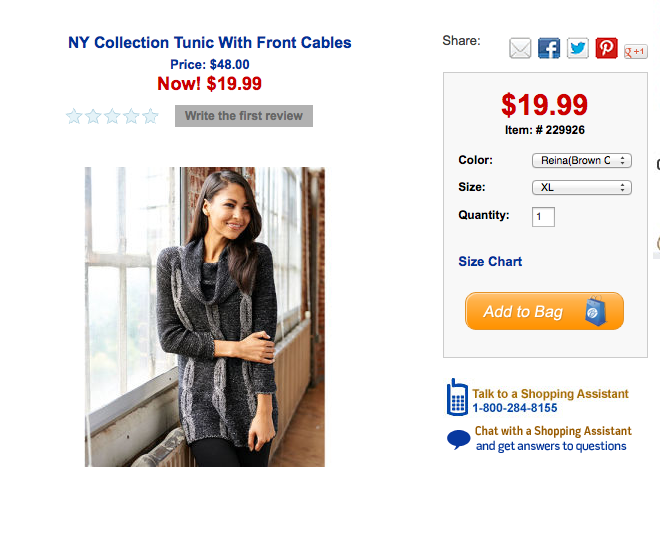
Let’s also say you’re broke like me, so you want to add it to a wish list, for that day when money rains down from the sky.
Click the UR gift bookmarklet.
A window will pop open.
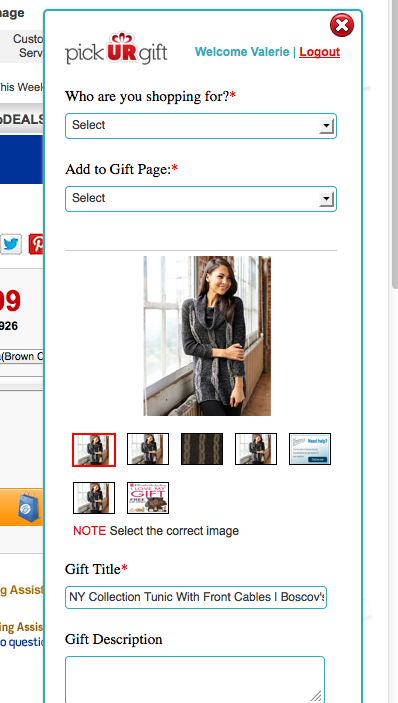
You select the person you’re shopping for (or in my case here, my wishlist), choose the image (for when there’s more then one) and then click add. You do have the ability to enter/change the product name, and leave notes. For my wishlist I like to add the price (in dollars). That way if I have a limited amount of money I can log in, easily find a gift that’s within that week’s budget right from my wish list and click to buy it. For the reverse wishlist you probably wouldn’t want to do that, but more on that in a minute.
The item is now stored away for when you’re ready to shop. You can shop any amount of sites and the gift ideas you add will all be stored in one place. Gone is the need for a wish list at each merchant. Gone is the need for a folder in your browser that says Christmas. Gone is the email kept in draft with links to all of the gift ideas you’ve seen. In place of all that is a screen with neat pictures. click on the picture and you’re taken to that site to buy your item. So easy!
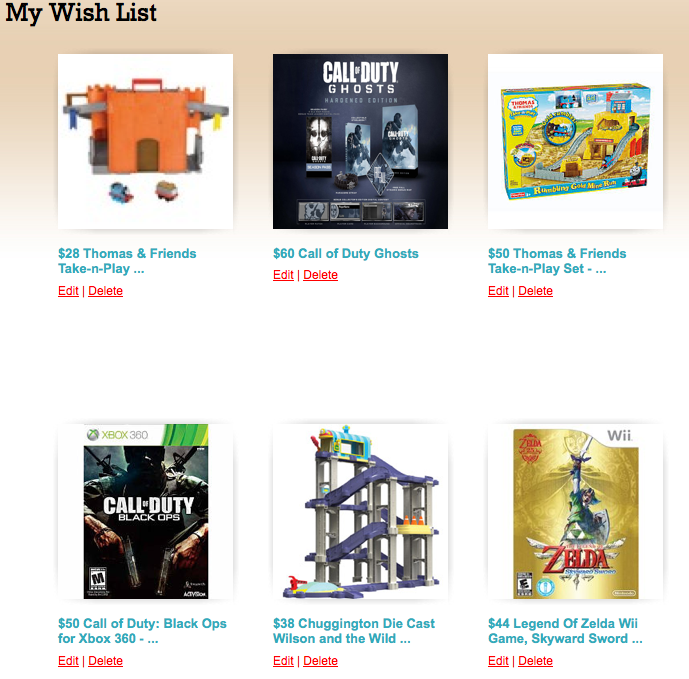
You can keep your wish list to yourself, or you can share it with others. After all, how in the world else are they supposed to know what you want?
Note bien. Not all of the products shown in these lists are not necessarily items that I am buying, will be buying, have bought, or necessarily even want. Some are products we already have. I included them to show how this works. I am fully aware that there are people that will remain unnamed (cough. my 17 year old son. and his friends. cough.) that are very eager to know what they’re getting so they snoop on my blog. Not happening boys, move on!
The Reverse Wish List
The reverse wish list is a list that you send to someone else, and they pick what they want. This would be great for college students, people that want very specific things, or even if you wanted to be a little humorous or convey a message. Let’s say you a family member you wanted to play a little trick on, or even convey a little message to. You add items just as you would if you were browsing and adding to your wish list, as described above. Then, you send them the link to their list and let them pick the gift they want or need the most. Here I wouldn’t use the price like I do for my own wish list. Yes, the person will know the price anyway when they click on it. But not putting the amount on display is just a bit classier

After you create a wishlist, be sure to choose if you want that list to be public or private. A public list will be visible to everyone and could even appear on the pick UR gift homepage, where other users can see it and get gift ideas. A private list is one that only you can see.
When all is said and done, you’ll probably have multiple gift pages. They’re easy to manage. If you want to manage gift pages, go to the pick UR gift dashboard and click “My gift Pages”.
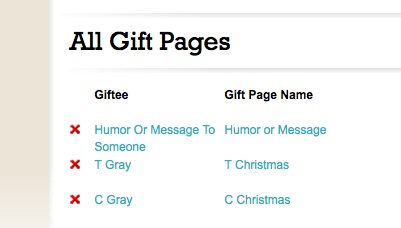
Click on the list you want to view, edit, or share and it opens up.
That’s it!
How do you manage or organize your holiday shopping? Leave a comment and let me know.
MORE INFO
pick UR gift on Facebook
pick UR gift on Twitter – follow along with #pickURgift on Twitter to see what others are saying!
WIN IT!
One (1) winner will
HOW TO ENTER. (MANDATORY)
To be eligible to win, entrants must:
1. Sign up on pick UR gift (please mention that this is easy to do – name, email & bookmarklet)
2. Create a wish list page and and assign it to someone (friend,family member, etc.)
3. Add at least two gifts to that wish list/gift page
Giveaway open to US only. Giveaway ends November 18th
a Rafflecopter giveaway

Oh wow this is so neat and makes things so much easier although I don’t want but 2 items for Christmas I may use this for year round.
This is such a wonderful way to shop for gifts. It will eliminate the pain of buying a gift that gets re-gifted.
I would love to be able to go look at a list for someone and just pick something. That way I would know that the person would like the gift I selected and not have to deal with a return.
I might have to use this all year long. I usually start making my list at the LAST minute. But this year I’m starting this week! I will not be last minute this year!
I try to gather gifts all year long so the bills aren’t so bad at the end of the year. There are a few people on my list that are sooo difficult to buy for. I would love to choose from a list they made! That way I know they want what I’m getting them.
I’m kinda thinking that I want to tell my kids to do this. My son probably wouldn’t take the time, but I’ll bet my daughter would!
Lists, lists and more lists! They’re the only way that I stay organized.
I love pickurgift. It makes gift giving so simple.
FYI: Anyone interested in coal, there is a ton pile high in my back yard–take some please.
I like that you have the option of making the list private or public. This could be helpful.
I currently use another service to make my lists but I like that Pick UR Gift offers the option to make a list private or public! That could definitely come in handy!
I use Pinterest to make my wishlists but this sounds really awesome!
What a great way to make a wish list and send it on to your family members! This is so cool!
My husband and kids! This would be an easy way to save things that I see everyday before I forget that I found “the perfect gift.”
This isso cool! I’d make one for my husband!