
I am a member of the #Microsoft Bloggers team. I have received product as a member of this team. This post has not been monetarily compensated. Please note that, as always, any personal opinions reflected in this post are my own.

I am feeling my age. I’m 48. When I was growing up parties just seemed to be simpler. Now it seems like people are planning things for ages. I knew someone that planned a small shower that had notebooks, papers, pictures, stickies and who knows what else scattered everywhere. If she had an idea she’d write it down. That’s smart. If she was inspired by something she’d save it. That makes sense. But she just couldn’t keep everything organized for some reason. There is a tool that can help you organize everything that you always have with you. It’s called Microsoft Office 365 Home. Office 365 Home users have online access to current versions of Word, Excel, PowerPoint, and Outlook if they are running Windows or Mac. Windows users also have access to OneNote, Publisher, and Access.
Let’s say you’re organizing a big birthday party. Maybe Sally’s Sweet 16. You’re renting a hall and inviting 50-100 people. What types of things would you need to track? I bet the list of things to track would include things like:
- Guests
- Tables and seating
- Entertainment
- Decorations
- Food
- Budget
Sally’s turning 16. This means there will likely be a good mix of people – Sally’s friends, family, and maybe some other smaller children. You could go with different sit down meals, or you could go with a buffet. Let’s say for this example you’re going with a buffet, and that you’re going to set up tables around the hall. Time to start organizing!
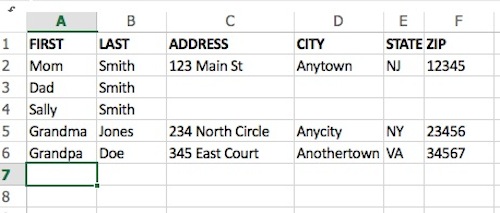
Guests are probably the biggest thing you need to track when organizing a party. If you don’t know how many people are coming you don’t know how much of anything you will need. The first step here is determining who you are going to invite. Open up Excel and create a list of all of the people you want to invite. Enter one person per line.
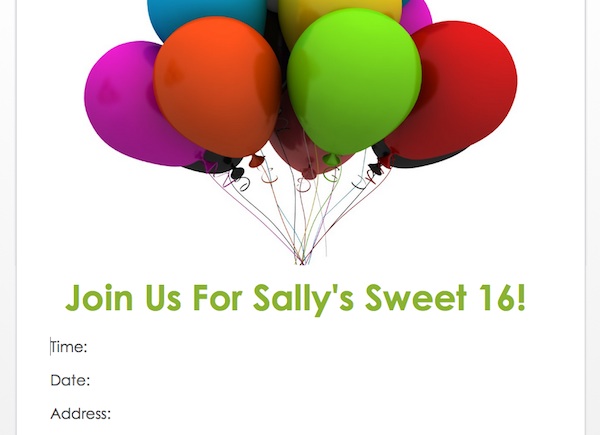
The next step is letting those people know. As soon as you determine the date of your party, let your guests know with either a “save the date” or an official invitation. Technology has come so far over the years that there is no longer a need to go to the trouble of ordering crazy expensive invitations. You can actually make really nice ones yourself right in Microsoft Word. Grab a template and you can modify it and have an invite ready to go within minutes. Or, design one from scratch. Once you’ve come up with an invitation that you like go on and mail them out.
Once invitations have been sent, it probably won’t be long until you start hearing back from people on who can attend. Make sure you make a note of this in Excel. I personally would take the original sheet your guest list is on and make a copy. Work from the copy, title it RSVPs. If people can attend they stay on the list, if they can’t just delete their line. This keeps your initial list clean for future use or reference, and allows you to have an idea of how many people are indicating they’ll be there at all times.
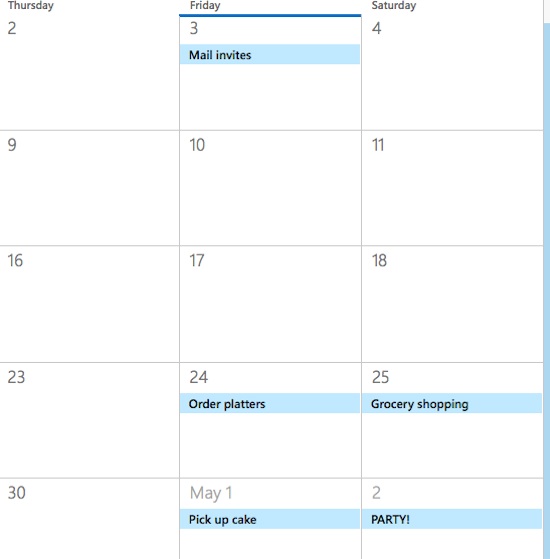
As your party comes together track important dates in the calendar in Outlook.
As the date approaches and the RSVPs come in you’ll have sufficient information to decide important things, like seating, and quantities needed for food and party favors and the like.

Where will people sit? You’ll have tables around the hall but who is sitting where? Use Word as a virtual “room”. Create tables to represent the tables and the people sitting at them. This will give you an idea of who will be where and where things will work best. Once you know how you are handling seating you can also use Word to create fun place cards or table numbers, depending on how you’ve decided to do things.
What are you serving, what will you need to make it or buy it, and how much of it will you need? If you know you have 50 people coming you know to order a large sheet cake or two. You also know you need several pounds of cold cuts, pasta salad, and ziti. And 6-8 dozen appetizers. Keep a running shopping list, using Excel (or Word if you prefer). Will you be giving away party favors? Will you be picking up centerpieces? Are there other supplies that you need to buy? Of course there are! Plates, serving utensils, silverware, cups and napkins are surely on your growing list. For things you are ordering – don’t forget to add the pickup date to your calendar in Outlook!
The great thing about using Office 365 for things like this is that there are no specific rules to setting things up, you can do it in a way that works for you. I find it best to just jump in and try a couple of things and see what will work best for you. If you aren’t imaginative in a tech sort of way, you can access free templates in Office 365 as well, which contain things like checklists, shopping lists, etc.
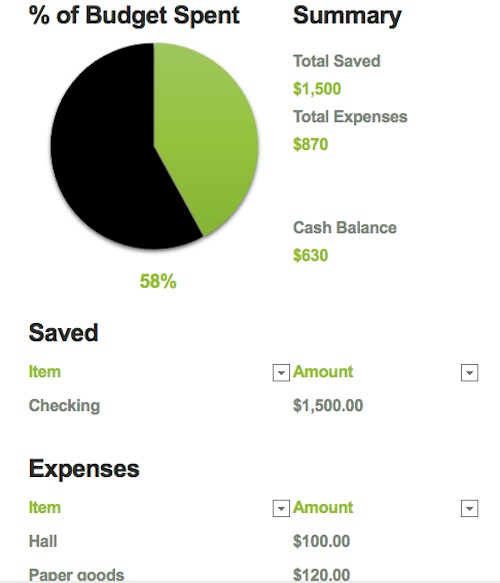
When you decided to organize this party yourself you probably had a dollar amount in mind for what it would cost. That’s your budget. Track spending against your budget. There are free budget sheets, or you can easily use Excel to create one of your own. A decent budget sheet will have your categories, what you’ve spent already and what’s left to be spent.
About now you might be thinking that you’ll have things nicely organized in your computer. And you will. But what if you think of something while you’re out and about? Will you remember it by the time you get home, and will you remember to go on the computer and add it? No need! Part of the beauty of Office 365 Home is that subscribers get the full, installed Office experience for up to 5 users, across platforms including PCs, Macs, iPad and Android tablets, and mobile phones. So, you can access your documents from virtually anywhere!
Before you know it the day of the party will have arrived. If you’ve used Office 365 Home to stay organized you won’t feel like you’ve moved mountains to make the event happen. You’ll know you took care of everything and be able to relax and enjoy!
Subscribing to Office 365 Home is quite affordable, it’s either $9.99 per month or $99.99 per year. The subscription comes with a good number of features, including 1 TB of OneDrive online storage per user, for up to 5 users. It also includes 60 monthly Skype minutes per user for up to 5 users.
Click to learn more or subscribe to Office 365 today!
You can also connect with Microsoft Office on Facebook and Twitter.

I’m a huge Office 365 fan. I’ve been using Office since the days of Windows 95, and it just keeps getting better and better.
Im trying to understand why i didn’t know about office 365 before this post!!! I NEED organization in my life so bad!
I have 365 but never really use. NOw you reminded me to take advantage of it and put it to use.
I could be far more organized, office 365 is amazing!
This looks like the real deal! I’ll use it next time I organize a party!
Not only will you save money for party organizers, you also brought out the creativity part of you by planning your own home party. It’s time to get Office 365 to work, this will definitely be an interesting learning curve.
I’m such a huge fan of Office 365 and I totally agree that it’s affordable considering just how useful it can be on a daily basis. I use it for both my day job and everything I do at home and with blogging.
I do a lot of events; half the time I am organizing something and juggling at least 3 activities. I think I should consider Office 365 – seems like it’ll make my life easier.
I’ve never used Office 365 but I know many who do. I’d love to get it for all of my party planning, I help set up parties in my spare time. It would be really helpful.
I’ve never had to plan a huge party before but this is great to know for when I do!
Other than finding my personal notes and changing my mind, the budget!
Well that’s neat! I wouldn’t ever think to us office anything for this. I believe I have this office but I’m not sure, I’m going to have to check now!
I do use Office 365 – Love it and what a great idea for keeping organized! I use a system in Office for my blog promotions! Thank you for the inspiration for other ideas 🙂
I did not know you could do all this with office 365. I have to check it. My challenge is having the right food quantity for the guests
You have lots of good tips here. I love the idea to announce the date so people can plan ahead. I like when that’s done for us too, if we’re being invited to attend.
I think the first time I ever used Windows was in the late 90s. Wasn’t that NT? Gosh. Seems so long ago. I use Office for everything these days. I do use Google Docs for a few things here and there but always go back to what I know.
I really need to get Office on my computer. Almost everything that is sent to me in an email is an Office document of some sort and I have to forward them to my husband’s computer to read them.
I need to get back Office 365, I had it on my old computer but have yet to install on this one. Thanks for the reminder.
I have Microsoft Office and I love it! It’s a great way to stay organized. Now that I’m party planning for daughter, I can use this post as reference. Thank you!
It’s nice to see that there are other people out there who take this sort of thing as seriously as I do. My motto: This is no issue so serious that it cannot benefit from a spreadsheet!
The most challenging thing about party planning for me is sticking to a schedule that makes sure everything is bought, ordered, picked up, and decorated on time. I haven’t had to arrange anything that needed invites and RSVPs though.
I really need to start using office 365. I will admit that I need to be more organized. I still use excel a lot.
I love using Office 365 because it helps me stay organized. I have never used it for party planning, so I will keep it in mind for my next get together.
I love using OFfice for everything! It is so convenient! Thanks for sharing your party tips!
When it comes to a get-together or party with friends, I’m always the one tasked to organize. And for me, the most challenging part is choosing the date.
I use Office on my desktop. However, because I end up on Google Hangouts, I’m usually on Chromebook and have to do conference organizing using the Google Drive apps. Office is definitely a great tool to use and I do recommend it, especially because of the stats you can pull so easily… then if you wanted to create a database, hook it up to Access.
I love planning parties and these are definitely great tips on staying organized. Great post!
Ohhhh man, this is so involved! lol
I would use this to plan a wedding but I’ve never had to plan a party that’s taken this much planning and effort before. I’ve got two daughters though so the Sweet 16 might require some chart action lol
I totally use spreadsheets when it comes to party planning. In fact, we used spreadsheets when we were planning our wedding!