
I am a member of the #Microsoft Bloggers team. I occasionally receive product as a member of this team. This post has not been monetarily compensated. Please note that, as always, any personal opinions reflected in this post are my own.
As some of you may recall, I had Lap band surgery five years ago. This past December my Lap band had to be removed as it had eroded into my stomach. I had started gaining weight before they removed it and once it was out I gained a lot. I went from being of acceptable weight to being obese once again. In March I had gastric sleeve surgery. This weight loss journey has been a wild ride.
One thing that has always been advocated to me is exercise. The more exercise the better. But, since having lung surgery, things just aren’t that simple. Even walking under certain circumstances hurts and leaves me gasping for air. A leisurely pace in a mall I can usually handle. Everything else – not so much. No uphill, no high wind, no humidity, no freezing cold. The list goes on. Basically, most activities that people would track cause me pain. The pulmonary specialists have some fancy name for it and said I’ll deal with it for the rest of my life.
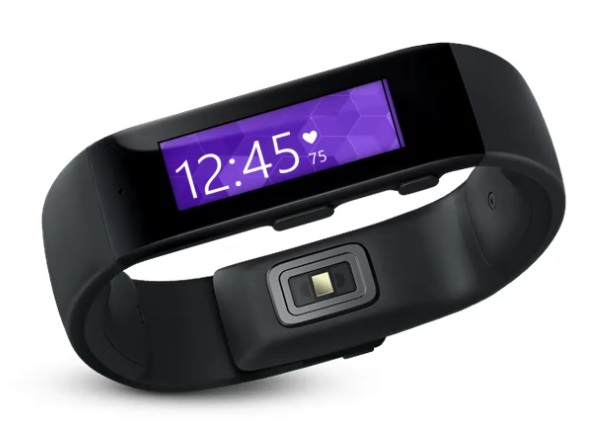
I love tech. I marvel at all of the new wearable tech products coming out, products that look perfect for people interested in fitness and losing weight. Products like the Microsoft Band shown above. I don’t have one so I haven’t tried it, but there’s no way I can deny it has some fantastic features and capabilities.
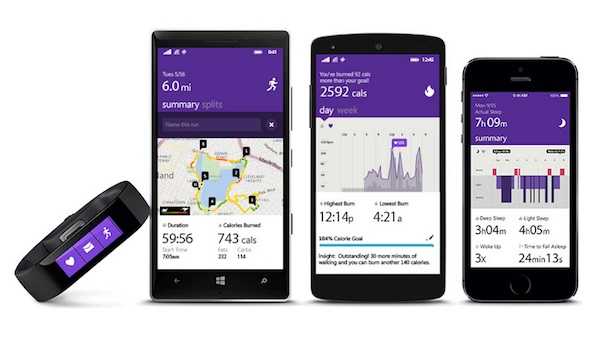
The Microsoft Band is the first device designed specifically for the new Microsoft Health platform. The centerpiece to Microsoft Health is a cloud service that serves as a central place for consumers and the industry to store data. It allows consumers to combine data they track across devices and services to create powerful insights available from the new, cross-platform Microsoft Health app available on Android, iOS and Windows Phone. The full-featured web dashboard provides insights, unique to you, in your favorite browser. The more you use your Microsoft Band, the more valuable these insights will become.

If you’ve been in a Microsoft Store lately you might have noticed the Band. A few weeks ago Microsoft ramped up inventory of the Band to meet the demand in stores. Microsoft also announced an expand of their presence in the US retail channel with the addition of three new retail partners – Amazon, Best Buy and Target. The Band is becoming so popular they’ve even made it available for £169.99 in the United Kingdom, a new market for this product!
At first glance the Microsoft Band might look like just another watch. Nay nay! The Band is not just a watch, and it wasn’t designed to replace a watch. The Band was designed to keep you connected with a number of aspects in your life, while remaining sleek looking with a low profile. The Band can be worn with the 1.4″ TFT full color screen facing out, like a wristwatch, or with the screen on the inside of your wrist, for more privacy. The Band’s battery life is 48 hours with normal use; advanced functionality like GPS use will impact battery performance. The battery is fully charged in less than 1.5 hours
The first thing you see when you turn the Microsoft Band on is the Me Tile. The Me Tile shows the current time and one of five indicators: Day of the Week, Distance, Calories, Heart Rate & Steps. Recognizing people have different tastes, users can choose from 12 different wallpapers and 13 colors to personalize their Me Tile.
When you tap the Me Tile and swipe to the left, you get a quick glance at your daily steps, distance traveled, calories burned and active heart rate. Swiping left from the Me tile you’ll see the remaining tiles on the band:
- Calls: When you receive incoming calls, they appear on the screen giving you an option to dismiss, or respond with a preset text message. Tapping directly into the Calls tile, you can see a record of missed calls, voicemail notifications and caller ID.
- Emails: Similar to calls, email previews appear right on your wrist. It’s perfect for those times when I’m out to lunch, or in a meeting, but waiting for an important email from my boss. You also have the option to tap into the email tile and see a complete list of your unread email.
- Calendar: If you’re constantly moving between meetings you can see where you need to go next with a simple glance at the wrist. You can also view upcoming meetings and appointments in the Calendar tile.
- Texts/Facebook Messenger/Facebook Notifications/Twitter: Microsoft Band also offers notifications for your text messages, and some of your favorite social networks like Facebook and Twitter.
On Microsoft Band, all of these glanceable notifications are optional and can be easily turned on or off via the mobile app. You can set things up however you like, in order to help you be your most productive. Be aware, the Band wasn’t only designed to help you be more productive. It was also designed to help you live a healthier life. Check out these terrific health features.
- 24 Hour Heart Rate Monitoring – Heart rate monitoring is normally reserved for chest straps or high-end fitness trackers. But Microsoft Band has an optical heart rate sensor that tracks your heart rate with incredible accuracy from a compact, wrist worn device. It lets you monitor your Microsoft Healthheart rate all throughout the day or night, whether it’s during workouts, while you’re sleeping, or simply going about your daily routine. And, you can check in as often as you like.
- Calorie Burn: Because we offer 24 hour heart rate monitoring, we can provide an accurate picture of your calories burned. In the phone app you can view your progress by hour, with your heart rate overlaid, so you can get an accurate picture of how your body is working throughout the day.
- Sleep Tracking: Each night before you go to bed, you can tell Microsoft Band that you’re going to sleep by tapping on the sleep tile. And each morning when you wake up, you can check the mobile app to see your sleep quality through the night. It shows everything from restful sleep vs. light sleep, amount of times you woke up through the night, the time it took to fall asleep, sleep efficiency, overall time in bed, and calories burned.
- Run Tracking – Thanks to Microsoft Band’s onboard GPS, you can now run without your phone. It will track everything from your route, to pace, distance, duration, splits and calories burned broken down by carbs versus fats – all of this information will sync up with your phone when you’re back in Bluetooth range. By tapping on splits, you can see pace per mile and average BPM. By tapping the heart icon, it overlays your heart rate on the run and shows when you were running in an anaerobic state versus aerobic state, giving a clear picture of how efficiently you’re performing.
Folks already focused on fitness will be happy to know that Microsoft Band will work hand in hand with fitness partners such as Runkeeper, Gold’s gym, MyFitnessPal, MapMyFitness, HealthVault, Strava and MapMyRide.
Last, but far from least, the Microsoft Band offers Cortana functionality. Anywhere on the device and at any time, you briefly press and hold the Action Button to bring up Cortana and speak your voice command. For those unfamiliar, Cortana is your Windows personal assistant. She can do a lot of neat stuff, and she can be funny! With Microsoft Band and Cortana, you can set reminders through the built-in microphone, and verbally add to your to-do lists without ever pulling out your phone from your pocket or purse. That’s pretty cool but it gets better. Those reminders are location-based so if you set a reminder to buy bread at the store, Cortana will remind you next time you are near the store. Cortana also has access to your calendar and schedule. Through the use of the Microsoft Band’s GPS tracker, Cortana will remind you when you need to leave in order to make it to your next appointment.
What feature about the Microsoft Band would you find the most useful in your daily life?
CONNECT
Microsoft Band website – Microsoft Band on Facebook – Microsoft Band on Twitter

That is such a cool gizmo! I might actually do some working out with this. Thanks!
I love trackers that can sync to the phone! I have one that doesn’t and therefore I never use it! This is so cool.
That does sound really useful. I think even my daughter could make use of it.
I’d love to know about sleep quality but would probably fall asleep before signaling the band.
I have a Fitbit, I love it but it certainly does not have all the amazing bells and whistles this has! I need to look at this.
I love the calorie burn. I love seeing how many calories I have used in a day
Sounds like a great product! I have been looking into getting something like this, and it sounds perfect!
I would like the heart rate monitor. This has so many great features. I will have to look at getting one for myself.
I have the microsoft band and love it! I use it more for tracking my workouts. I love how it automatically syncs up to MyFitnessPal. There are a ton of great things about it!
My friend just got one of these and Loves it! I need to check them out!
Love it! I love the technology and I could so use this gadget – need to get the baby weight going off me
Got to love technology! I really like that you can connect this with your phone and be able to dismiss incoming calls without having to dig out your phone while working out. It’s literally all in the wrist. I would definitely use it for the Heart Rate/ Step counting.
An activity tracker is a great way to stay motivated for weight loss and an active weight loss. I have not heard of the Microsoft one before it sounds great!
I love keeping track of my activity! This looks like a neat gadget to do so!
I love trackers, they are so helpful to get you started or keep you on track. This one looks really slick.