
This post is brought to you by Invoice2Go.

These days when I open up Facebook I see many of the people I know discussing the direct sales ventures they’re involved in. You name it and chances are good that someone you know is selling it. Or, maybe you’re selling it. Then, there are folks I know that run small service based businesses. Plumbers, handymen, electricians, hair dressers are just a few that spring quickly to mind. There are still others that offer other services, things like pet sitting and house sitting. And finally, there are those that help watch our children. Those people all have very different jobs with very different responsibilities but they all have at least one thing in common – they are running a small business and they need to be paid.
While getting a job done and being paid are important, they aren’t the only important thing in a person’s life. Family is also important. Many people just don’t have enough hours in the day to get work done and then go home and worry about putting bills together and getting them out to the paying customers. The small businessperson needs an easy way to handle the financial end of things. That’s where Invoice2Go can be of use.
Invoice2Go was the winner of Best App Design at the 2015 Spring Awards. This small business invoicing app was created by a small business owner, and was designed to help other small business owners stay mobile, organized and connected to maximize their cash flow. It is very easy to set up, it only takes a couple of minutes.
Fill out your company details.

Next you choose the style,color and background for your invoices. There are more than 20 invoice templates. You can even customize your invoice with your logo or, if you don’t have a logo use the tool in the app to design a new one.


The next step is to let Invoice2Go know what field you will need on your invoices. So, if you carry actual parts you might want to add product codes, as well as labor.
If you collect tax you set the rate for your area.
Then you’re ready to go.

Want to create an invoice? Give someone an estimate? Go for it!

Enter a little information and click a couple of choices and your invoice or estimate will be ready to email to your customer. Once you send an invoice it is automatically filed as awaiting payment.If your work involves keeping track of time you’ll appreciate the built in time and location tracking feature that will clock you in and out and keep track of he time you spend on a job.

From the dashboard you can access a lot of information and see everything you’ve worked on or are working on.
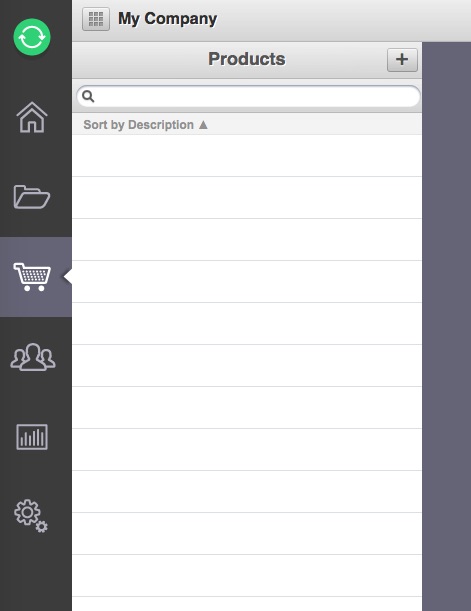
You can access your product list.

And you can manage your client list.

Reports are available with just a click.

You can drill down deeper into your reports with another click or two. You’ll know with a quick glance how your sales are doing and who owes you money.
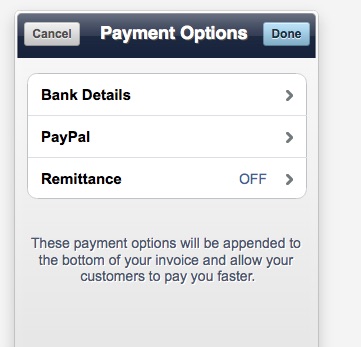
Payments are easy to receive. In the settings you enter how you’d like to receive payments – by deposit into a bank account or by paypal.
Here’s a video showing how easy the app is to use.
I think it’s great that Invoice2Go can be used on your computer, tablet or mobile phone. And there’s no need to re-enter information as Invoice2go uses the cloud to continuously sync your accounts. So whatever you do on tour desktop is available on your phone and vice versa. You can even use Invoice2Go if you have an Apple Watch. Imagine being able to send an invoice without doing anything but touching your wristwatch a couple of times! At Apple’s WWDC 2015, Apple featured Invoice2go’s Apple Watch app onstage during a presentation on Designing for Apple Watch, as an example of good design.

When you consider what not using an invoice system could actually cost a business it’s easy to understand why a business should use one. The actual Invoice2Go app is free to download. After that you determine what you pay by the features you need. The Pro and Enterprise plans offer some features that the Starter plan doesn’t have available, such as:
- Receipts: Save photos of your receipts and generate expense reports for your accountant or customers.
- Document Signing: Customers can sign documents on your tablet or mobile phone.
- Statements: Send your customers a full update of their accounts, including paid and unpaid invoices.
- Calendars: Add time entries for jobs and then upload them to your documents.
- Maps: Insert location information into documents and see where your sales get the most attention.
- Scanning: Add barcodes and QR codes to invoices with ease by simply scanning the information you need.
Do you know of an entrepreneur or small business owner that could use Invoice2Go?
CONNECT
Download Invoice2Go for iOS for free. Download Invoice2Go for Android for free.
Invoice2Go website – Invoice2Go on Facebook – Invoice2Go on Twitter

That sounds like a smart solution for business owners. I am sure this will be very popular.
I think this is such a great idea. You can never be too mobile or too flexible.
This sounds like something I can use for my growing business. It seems easy enough and affordable too.
I’ll definitely be looking into this. In today’s business environment, it’s all about being fast, flexible, and available.
We actually use Invoices to Go with Hubby’s business. It is really easy to use and we love it.
This would be perfect for my essential oil sales! I am going to have to check it out!
What a great service this is. I will let my friends in direct sales know about this.
I just love how easy it is for people to do business these days. What a great solution!
This is something I could use as we grow my hubby’s photography business! What a great way to do to invoicing it looks SO easy!
This sounds like a great program to use. I will have to share this with my friends.
I love how easy this makes it to send an invoice. I will have to give this a try.
This is an amazing program! I do a lot of freelance work and this is an ideal way to help me organize it all and ensure I’m being paid!
I’ve heard about this but didn’t know much. Thanks so much for the information. Wonderful!
How awesome. Makes things a lot easier.
This is an awesome app for small business owners! I’ll have to keep it in mind if I have need of invoicing customers since I could access it anywhere.
Wow this really has everything you need. I can see this coming in handy in so man situations.
What a useful tool for small businesses!
what a great tool for for small businesses. it looks very user-friendly.
This will make things so easy for business owners. I will share this with my brother.
Electronics has changed business procedures–sort of instant gratification to companies.
I needed to hear about this today! My current system is not working so I’m off to look into this more!
This seems like a great app, especially for those in freelance or direct sales like you mentioned. It could be extremely helpful for a lot of people. Thanks for sharing!