

Make Your Own Crowns
What kid doesn’t love a party crown for their birthday, or maybe just a crown to be a prince or princess for the day. These crowns are a big hit with both the boys and the girls. You can even customize your crowns with pictures or ages by using MyMemories software.
These freebies are MyMemories Suite Compatible. What does that mean??? It means that you can now load the freebies directly into your MyMemories Suite Software, and then completely customize them with any paper and embellishments that you have. If you don’t have the software, you can still download the sample project and the elements, but you will not be able to customize the project.
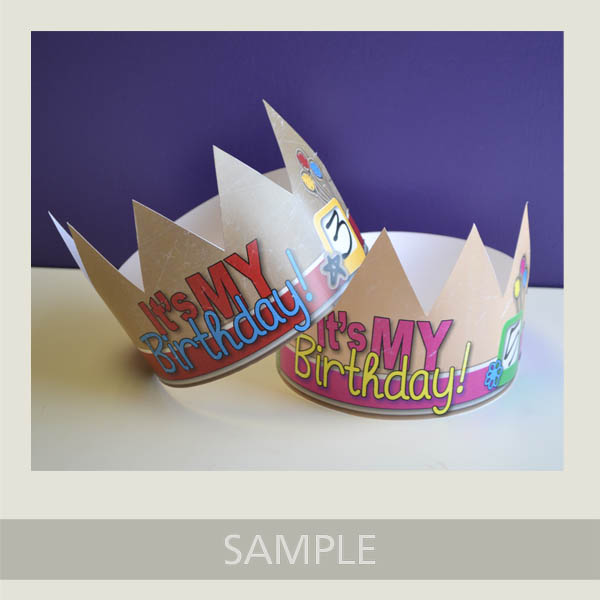

Using MyMemories Software to Customize your Crown
Download template file and install it into your software
Using MyMemories Suite, choose Create Album From Designer Template and find your project
Now you can add pictures, print and enjoy the provided template, or customize it with your own papers and embellishments.
TIP:
You can right-click on the white guide and lock it in place to keep it from moving while you are working. Make sure this is the top layer of your project before printing.
Instead of adding the paper as a background paper, you can add it as an embellishment so that you can move the paper around. This is especially useful when using papers with stripes or circles, so you can decide which part of the paper you want to use.
Once it is added as an embellishment, you can now select the paper and move it into the position you want it.
Just SAVE and PRINT on cardstock!
Crown Tutorial
1. Print your Crown templates on cardstock and gather supplies. (Recommended supplies: craft knife, cutting mat, metal edged ruler, small scissors, stapler)
Print out template page
2. Using the craft knife and metal edged ruler cut along outside line.
TIP: a small pair of scissors could be used as an alternative, especially when adding decorations to the top points of your crown
3. Align bottom edges and staple together.
4. Repeat on other side to form a circle.
If you’re really interested in digital scrapbooking, be sure to check out My Memories Suite v3 . It can be purchased online and retails for $39.97. If you use coupon code STMMMS45174 you will receive $10 when checking out.
Some posts on this site contain an affiliate link. Affiliate links are used in an attempt to offset the operational costs incurred by running this website. Clicking on an affiliate link does not increase the cost of the product if you buy it. It does mean that I MAY make a commission if you purchase the item. As an Amazon Associate I earn from qualifying purchases.

This sounds great. I am going to do this for my little nephew who will be two soon. Thanks for sharing this!