
Recently I heard of the photo software Fotobounce. I haven’t tried it yet but I found this user review that they shared with me pretty interesting.

Recently there has been a great deal of discussion regarding Privacy and protection when dealing with social networking sites. When it comes to privacy related to sharing digital photos few individuals realize the available alternatives. Fotobounce is one of those alternatives that allow you to take advantage of advanced facial recognition technology and full-resolution photo sharing while still maintaining your privacy.
I have thousands of photos on my laptop scattered in different folders in my attempt to organize them. I’ve chosen to keep my photos off of Facebook and Flickr in an attempt to secure my privacy. This means I have the tedious task of sending my photos via email to my friends and family and given my large holdings it has become difficult to find specific photos to email out. Recently I have come across Fotobounce Software which has respectfully solved all my problems. I’ll tell you a bit about the software and what it offers.
Fotobounce is a digital photo management application that allows users to manage, store and share full resolution digital photographs securely between a private network of friends and family, referred to as “Bouncers”. This private peer-to-peer network protects users from the increasing privacy concerns and uncertainty that comes with relying on internet storage services or social networking sites.
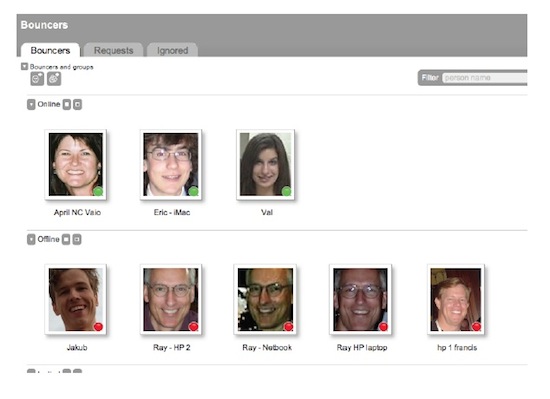
Once Bouncers are online they will show up clearly on the user’s Private Network panel as can be seen in the screenshot above. The bouncers then can browse and download the users photos by People, Events, Places, Keywords, and Collections. Users can also adjust which bouncers can view and download which albums.
With this private network my friends and families can easily download and browse all my photos as they please and I can do the same with their photos. Best of all they don’t have to wait until I have the time to email photos to them and I no longer have the tedious task of finding and sending photos.
Organizing your photos with Fotobounce is extremely easy as well, solving my scattered folder problem. Along with “People” and “Date,” Fotobounce users have multiple options to organize photos into different album types. This provides more targeted photo organization and improves “search and find” capabilities. The album options include: Event, Place, Collection and Keyword. This has allowed me to easily find my photos based on date or event or if I want to find all photos of a specific person I can easily thanks to Fotobounce’s automated tagging process which will be explained below.
One of Fotobounce’s most fascinating features in my opinion is its face recognition technology that automatically detects faces when photos are found or imported. As faces are detected by Fotobounce and tagged by the user, this “trains” Fotobounce to learn who people are and helps automate the tagging process. Note that all of the face recognition data remains local to your computer, unlike the features offered by major social networking sites where they store and use your face data on their public servers.
If you are a fan of sharing photos on Facebook and Flickr this can also be done through Fotobounce effortlessly. Photos are uploaded directly from Fotobounce – with tags and descriptions intact. There’s no need to spend additional time painstakingly re-tagging photos and no browser-based transfers or third-party software is required.
Fotobounce also released a new product called Fotobounce Viewer, now available for browsing Fotobounce libraries remotely and securely from Android, Windows, Mac and Linux systems. The Viewer makes it easy to browse photos and share them on the go from any platform and practically any mobile device as long as your Fotobounce account is running on a computer with internet access. I use this cool viewer to connect to my Fotobounce account through my Android phone so I can show somebody a photo when I’m away from my computer.
Fotobounce allows you to choose a unique Fotomail name that enables users to email full resolution photos from any portable camera device directly to their Fotobounce system on their desktop. The next time Fotobounce is launched, the user will see that photos are waiting to be imported. I love this feature since I am constantly taking photos with my mobile phone. Instead of waiting to get home to upload my photos I just email them to my Fotomail account and BAM! they show up on my Fotobounce inbox at home ready to be imported to an album. If you have friends or family sending you photos you can also have them email those photos to your Fotomail address.
To top off all of these great features Fotobounce is FREE! It is ad-supported, but the ads are not in your face. You can also purchase the version without ads for $49.
I highly recommend using this product, it has significantly changed the way I manage and share my digital photos. Try it out!
by Scott Desantis
MORE INFO
Download it here: http://fotobounce.com/download/
Find out more information here: http://fotobounce.com/features/v-3-0-highlights/
Fotobounce on Facebook
Fotobounce on twitter
This is a sponsored post. The information contained in it was provided to me by Fotobounce.

nteresting and free for now but what about later?I
It will always be free!