
#spon: I am in a partnership with Intel. Through this partnership I gain access to content, product, or other forms of value. 

It’s almost time for the annual IEP meeting for my youngest son. An IEP meeting isn’t a simple thing to explain, but in the simplest way I can put it it is a meeting with my son’s school and the district where we all discuss progress that has been made, determine goals for the upcoming year and steps to take to try and achieve them. One of the main things we will be focusing on this year is moving towards constant letter and word recognition with out prompting and modeling as a part of a move towards reading, as well as our ever present goal of improving speech.
In case you missed my first post on it, w’ve had the Intel AIO Chromebook for a couple of months now. It’s a great unit because it’s so affordable and speedy, and it’s actually pretty capable as well. My youngest fell in love with the Intel AIO right after we got it. So I thought it only made sense to make use of the technology literally at our fingertips and use it to help reinforce those areas that need extra attention.
It only takes seconds after you turn the power on for the Intel AIO Chromebook to boot up and be ready to use. One of the very convenient things about it is that installations are easy. Back in the day you used to have to go through a stack of floppies or CDs in order to install software. Not so with the Chromebook. Everything on the Chromebook is browser based, it has no drive and can’t even run an exe file. Similar to a cell phone you just go to the store and find the app you need and click to install.
I looked for a few different types of apps in the Google App Store to install that I felt would help work towards our goal.

Alphabet and number recognition. He knows them but it’s always good to practice. I found a couple of these apps. The ones I liked best displayed the letter on the screen. The Intel AIO is a touchscreen, remember, so all my son has to do is touch the letter and the sound of the letter is spoken.
Dolch sight words. My goal is to try and help take him past letter recognition to simple word recognition. I found an app in the store that had over 300 words, broken down into levels. We’ve started with the earliest one which is covering very simple words, most of which are two to five letters long. I have CJ tell me what the letters are. I ask him if he knows the word. If he doesn’t we can touch the screen to hear the word, then I have him try. He thinks of it as a game.
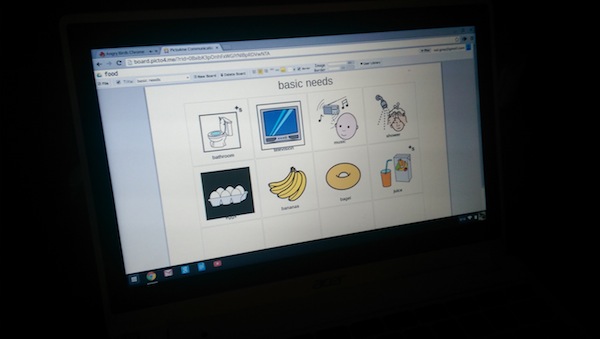
Picto4me. This is a specific app I found in the store that helps my son communicate. It’s an online application for editing and playing pictographic communication boards. The app has a lot of clipart of common items, ranging from food to needs to activities and more. If there isn’t clipart for something you can add your own image. Once you have the image you assign it a description. Then you can choose to give it sound. If you give it sound and press play a computerized voice will read it aloud. This is an awesome tool online. The boards you create are stored online. It is possible you may have seen some people using PECS boards in real life. The great thing about this free app is that all of the boards you can create can be downloaded into a PDF so you can print them out.
We also use our Intel AIO for fun stuff too. For my youngest that usually means playing games. Some people don’t always realize it but games can be a good thing to. Coloring is a great way to enhance fine motor skills. Memory games area great way to have fun while thinking. Even Angry Birds encourages thought on action and reaction.
The Intel AIO would be a great addition to any household. With models priced starting at $199, the Acer C720 Chromebook
How would an IntelAIO Chromebook make a difference in your life?


The holidays are coming–the family is large–I am big on electronics–need I say more?
I haven’t used the Chromebook myself but I am hearing great things about it! It sounds like a great device if you don’t want to carry around a full sized laptop!
I would love one of these for Christmas, I better start dropping hints 😉
looks like a great computer. i’m glad your son found an app that works really well with him.
What a great computer and those apps!! I think my christmas list grows every time you share something!
Wow, that’s so affordable, and they have so many ways to help him learn! I’d love it to help me get work done.