
This post is brought to you by PicJoy.
Do you take photos on your mobile phone? While I don’t take all photos with my phone, I have to admit that I do take a fair amount of them with it. And then what do I do with them? I store them in folders according to the date taken. If I’ve taken a lot of photos that day I might put the place also. After that, I put the folder into a folder that lives on my desktop. It’s definitely not the easiest system to use, particularly if you don’t remember exactly what date a photo was taken. At best I will mark a folder with a location. I tried tagging photos once years ago and it was time-consuming so I didn’t do that anymore. Today, a new app called Picjoy can take care of that sort of stuff for you.
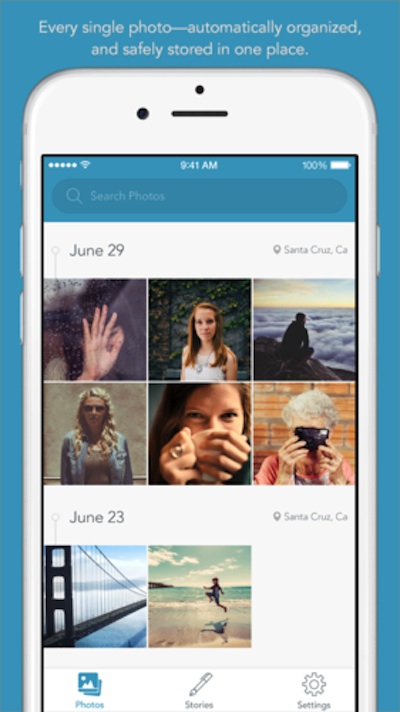
Picjoy is a free photo library organizer. Simply put, Picjoy automatically organizes your photos so you can spend your time enjoying them instead of trying to organize them.
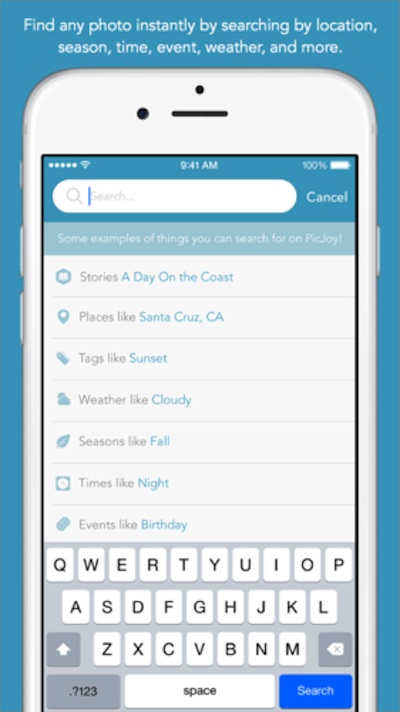
To organize your photos PicJoy obtains information from your phone, which it then uses as a part of a complex algorithm to automatically create tags for each photo. Tags relate to information like the time, date and place that the photo was taken. Even the photos on your iCloud account can be tagged, which means that you can quickly find the picture that you’re looking for wherever you are. You can also create tags manually if you like. Plans to add other cloud-based storage including Dropbox, Google Drive, and Amazon Photos are in order for in the near future.
Introducing Picjoy from PicJoy on Vimeo.
Along with tagging your photos, Picjoy also automatically gathers information such as date, season, weather, holidays, events, landmarks, and places, all of which make your photos easier to search. This is perfect for those times that you’re searching for something but only have a vague idea of the details. An example would be if you were looking for a specific photo from a snowstorm, but you didn’t remember which year the storm occurred in.

Another feature that the app has it that it helps enhance your photos and preserve memories by allowing you to easily add stories to the photos, from within the app.
How do you organize the photos you take with your phone?
CONNECT
Download Picjoy for free in the app store.
Picjoy website – Picjoy on Facebook – Picjoy on Twitter

Thanks so much for sharing this. I am in dire need of PicJoy. I have about 50 trillion picture taking up my phone.
Oh this is nice! my pictures are SO unorganized and I really need something like this to make them more organized.
I go so overboard with the picture on trips so this would help me a lot. It’s amazing how many I take in a single day.
I am pretty good about creating a folder and putting pictures into it, but I do have some older photos to sort and it sounds like PicJoy is just the ticket to getting them all organized FAST.
I take gazillions of photos and this sounds like an awesome way to keep everything organized. I will check it out.
I take more photos than I care to admit. I need to check out PicJoy I’ve heard quite a bit about it! Sounds great!
This sounds like a great app. I am so bad about not organizing the photos on my phone!
An app like this is perfect for me! I take a TON of pictures and enjoy looking back on them often.
I need this app. My photos are not organized at all.
This sounds like what I need! I am always on the search for photos and this is a great way to organize them.
I use my phone for photos more than anything else. I need to work on organizing better. This sounds like a great way to do that!
I take a ton of pics and I do the same thing- They’re on my desktop in folders and I’m supposed to put them on my external drive but rarely have time. Thanks for sharing
This is something I could really use for my phone. I am horrible at photos on my phone… have to just scroll through to find something. Sometimes takes forever. This would for sure help!
Organizing pictures has moved from full bins beneath the bed of prints to files on them in the computer to scattered on desktop. Fact is I need to organize. However, most of my pics are not taken on a phone.
This is an great idea. Mine are just on the phone, no organization about it.
I take quite a few photos with my phone. I have been using Shutterfly for eons. Before that it was another company, and another before that; which you actually mailed your 35mm film in to them. So, my account is FULL of photos. I have a folder on their to dump my iPhone photos. And when I get time I move them to their appropriate categories. I’ll have to check out PicJoy. It might save me a few steps.
My pictures are not organized at all. They are just in the gallery. I definitely need to check this out.
This would be perfect for my Daughter. She is always taking photos of her and her friends. I will have to share this post with her.
I don’t organize them. That’s the problem! This would make things so much simpler.
Other than organizing them chronologically, I was stuck scrolling through all of my photos. This would make life so much easier.
I love a great photo app! I have so many pics in my phone I might need PicJoy help!
I love this idea! My pictures are really unorganized and I would love to be able to organize using something like this.
I definitely need to try this, my pictures are all over the place. I’m going to check it out now.
My photos are in need of organized. This would definitely help to organize them.
What a helpful app. I take almost all my pics with my phone!
Pic Joy sounds great to me. My teen takes so many great pics and then she just deletes them to make room for new when her memory fills up. Scandalous. I wonder if she would like this…
PicJoy is definitely something I need! I take a lot of photos, so being able to have them organized would be amazing.
I have so many photos on my phone! They seriously need some organizing! Thanks for sharing this.