
This post is brought to you by Flyp.
Mobile phones have come such a long way in a relatively short time. I am never, ever without mine. But, as I have mentioned before, I do not share my cell number with most people. I only share it with select friends and family. Recently I shared my favorite app, which offers a way to have two different numbers on the same cell phone. I’ve seen discussions online where some people would want to have even more different numbers on their cell phone. And believe it or not, I have seen people carrying three and our cell phones at one time. These folks might want to check out Flyp.
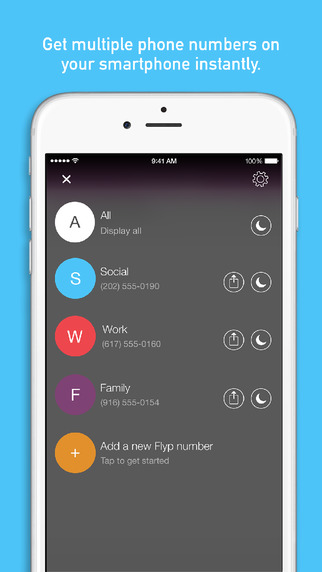
Flyp was designed for people who like their privacy, or for those who prefer to compartmentalize their life like I do. Flyp users are able to have a different phone number for each aspect of their life. You can use one number for bills, another for family, another for social media, another for coupons and newsletters, etc. Flyp is an ideal app for your child’s phone, as it means they will never give out a real phone number that can be connected to them directly.
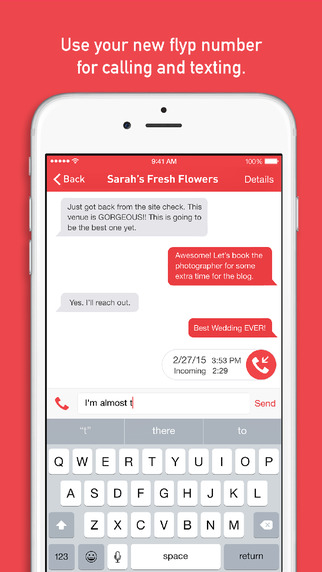
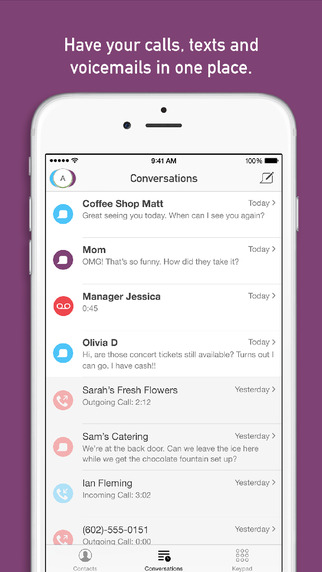
Flyp phone numbers users receive are real phone numbers that can be used for phone calls and texting just like your current cell phone number. Something that makes Flyp really stand out in my mind is that no matter if you have one Flyp number of five, everything is done from within the same app. No more switching between apps for phone calls and texts. And, even though all of your numbers are controlled from within one app, you can handle each number as you choose by simply muting any numbers you like at any time. So if you’re at a family reunion, you could mute all of your other numbers for work and such.
Your first Flyp phone number is free. You can have up to five additional numbers after that, for which a charge is incurred. Subscription rates are $2.99 USD per month or $29.99 USD per year for each additional Flyp phone number. Payment for the subscription is charged to your iTunes Account at confirmation of purchase . Your subscription will automatically renew at the end of the subscription period. If you don’t want your subscription to auto-renew, you must turn it off at least 24 hours before the end of the current subscription period. Your account will be charged for renewal within 24 hours prior to the end of the current period at a rate of $2.99 USD for monthly subscribers or $29.99 USD for yearly subscribers. You can turn off auto-renew at anytime from your iTunes account settings. If you turn off auto renewal you will be able to use your Flyp number until the end of the current subscription period.
All Flyp phone number subscriptions include:
- Choosing an area code for your Flyp number
- The ability to customize your voicemail greeting
- The ability to personalize text-to-voice Quick Reply responses
- Do Not Disturb for each individual Flyp number
If you have an Apple Watch you’ll be pleased to know that Flyp for Apple Watch allows you to receive notifications of an incoming call or text. You can respond to an incoming call by using either Quick Reply or sending the call straight to voicemail. Flyp makes your life easier, enabling you to scroll through all your Flyp numbers, get status updates, and even enable Do Not Disturb for any or all of your numbers right from the app home screen.
Flyp phone numbers provide the same call quality as your current number. It’s free to download, easy to use, and you can import your current contacts. If you want or need multiple phone numbers, using the Flyp app is certainly lighter than carrying all those phones. And think of the electricity you’d save and chargers you would no longer have to carry around if you used Flyp!
How would having multiple numbers on your phone make your days simpler or less stressful?
CONNECT
Flyp website – Flyp on Facebook – Flyp on Twitter
Download Flyp for iOS. Download Flyp for Android.


I always have my phone ringer on mute so I miss calls. It does sound like a great app though.
I could never handle multiple numbers, but I know so many people that do 🙂
This is so perfect for me. I use my cell for everything, but sometimes I wish I could give one number out to businesses and one out to family. What a cool idea!
I am not sure I could handle so many numbers! But this is wonderful for business people!
This is an interesting idea. I am not sure how it would help me. It is something to think about.
Multiple numbers? I don’t know if I could do it but sounds great!
Really interesting. My husband and some other family I have forward google phone numbers for just this purpose. They can always tell which line it’s coming from.
An app like this would be helpful for my husband, who has a work phone and a personal phone. I love the idea of separating my own business calls too.
I could use this app! It is a great idea
Flyp really sounds like a good app to have. I don’t like it when I’m writing an article and get interrupted by someone I don’t even know.
What a cool service. I use Google Voice for similar functions, but I love the ease of use this seems to have!
Sounds like an interesting app. I have sworn off cell phone for now. We do not get any service at my home anyway.
I can definitely see how this app would be handy for those multi-phone carriers! So much easier to balance 1 phone for 2 #’s
What a great feature. We don’t have a landline, and I don’t always want people to know my cellphone number.
Flyp sounds like a very interesting concept for an app. I had not thought much about needing a different number for different people, but after reading your post I now realize why multiple phone numbers could be useful. I will definitely check out Flyp in the app store!
I am probably one of the few ones left with a land line. I keep that one for doctors and bills. I only give my cell out to close friends and family. This does sounds like a pretty neat app though!
That’s so cool. I didn’t know this was possible. It could be nice to get my second number on my phone.
That is genius and would be so great for me. I have no home phone but would love to keep my personal and business side of my phone separate.
This is so cool! I don’t have a use for multiple numbers as I use my cell for everything, but I love how far technology has come.
This would be so handy when you are waiting for a call. I hate to miss an important call.
This is interesting. However i think I’d end up confusing myself as to which phone number I assigned to each purpose.
That’s a really great feature. I’d never heard of something like this. Cool app.
Interesting…much like the party line of old home telephones.
This is a great idea for those of us that don’t have a landline! Even though I will still not answer my phone most of the time lol I rather text
Wow this is super interesting. Sounds like such a cool app! Thanks for sharing!
Wow, I never knew anything like this existed. I LOVE this idea, so many times this feature would have come in handy with two phone number, love it!
Wow.. that’s amazing. I’m intrigued, I’ll have to look into this a little bit more but I would definitely try it.
I love this app! I am going to download it. It will make my life so simple as I have multiple numbers already.