
This post is brought to you by PicsArt.

If you’re like me, you enjoy taking pictures. I take them all the time, and of all sorts of things. Which is what I love about Instagram – you can not only share your photos there but you can also just look at other great photos. Now if you’ve used Instagram then you know you can do some editing with it. If you want more editing capabilities you have to look elsewhere. Where? PicsArt would be a good place to start.
If you aren’t familiar with PicsArt, it’s not just your ordinary app. The app isn’t brand new, it’s already been installed over 200 million times to date. There is a wide range of editing and creative functions within the free PicsArt Photo Studio app, and even more through in-app purchases. I myself downloaded the free app for my Android and haven’t run out of neat things to do with it yet.
You can use photos from your gallery, or take new ones with the camera.

I tried both.
Are you familiar with our puppy Dobby and our cat Jules?

That’s a photo I took earlier this year.

I gave Dobby a hat and put some colorful clipart into the photo. The hat just cracks me up.
Wanting to be a bit more creative, I headed outdoors. Hubby was starting to mow the grass. Well, we don’t really have grass. We have weeds and sometimes the occasional wildflower pops up.

Flower in purple grass anyone?

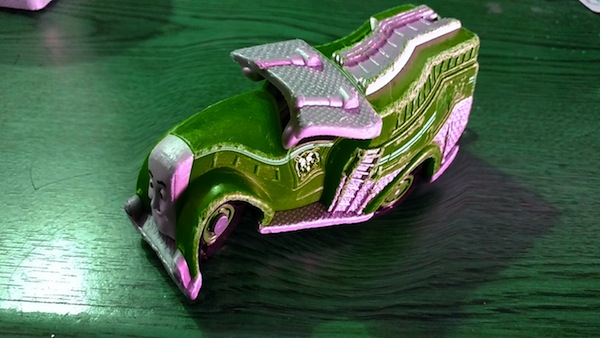
Then I commandeered one of my son’s trains. It’s old, faded color just doesn’t whet the whistle anymore, as it were.

It really popped with a bit of brightening. And some distortion LOL.
And, there’s more. Along with taking and editing photos, you can also create collages, or just draw pictures.

I have spared you my drawing efforts. They are dismal. But, I can share a video with you, showing a train being drawn.
Wasn’t that cool! There are lots of other videos on the PicsArt YouTube channel that can provide inspiration and ideas, or show you how to use certain features of the app.
PicsArt isn’t just a photo editing app. It’s actually a mobile community. Let me explain. On Instagram you can share and comment. While those things permit interaction with others, it is limited. PicsArt takes the interaction within the mobile community to another level by focusing on co-created content. What? You’re probably wondering how a photo can have co-creators. Well that’s simple. Sally uploads a photo and tags it #freetoedit. Johnny, Joanie, Susie and everyone else are free to edit and remix that photo and then share it with the world. Everyday users are creating, editing, remixing and sharing over 5 million images with PicsArt.
“Creative inspiration can come from anywhere, that’s why PicsArt focuses on giving creatives the tools they need wherever they find inspiration,” began Hovhannes Avoyan, founder of PicsArt. “The adage goes – the best camera is the one you have. Well we think that is true for editing tools too, it just doesn’t make sense for the modern photographer to be tied to 25-year-old desktop tools when they can capture edit and share images in seconds with PicsArt.”
The latest PicsArt update offers some really great features!
- PicsArt users are now able to upload and share their favorite .gifs directly through the app as they would a picture from their camera roll or the cloud.
- Images being edited can now also be saved as a draft, so users can step away from a work and come back to it later.
- PicsArt will support 8 megapixel images, up from 3 megapixels previously, to match the sensor size of today’s popular smartphone cameras. More megapixels means higher resolution images, so pictures stay vivid and lifelike even after they are uploaded to the PicsArt app.
- Furthermore, images edited and enhanced through PicsArt can now be printed at 300dpi (dots per inch) an industry standard that enables works to be submitted for contests or professional work.
Additional new features were added to PicsArt in yesterday’s update. This latest update enables users to collaborate on work via Facebook and generate timelapse videos that showcase their unique editing techniques. To create the timelapse video, users simply tap the video icon to begin recording and then tap it again when finished to export the video across their network. Extending the #freetoedit feature I’ve already mentioned, the latest update extends the users ability to collaborate by sharing tagged images to Facebook. This will allow users to invite Facebook friends to view and edit their creations with the #freetoedit tag in posts, as well as use Facebook to cast votes for PicsArt photo competitions.
Additional features that came with yesterday’s update include:
- The ability to adjust proportions of added photos/Clipart images when inserted into the app.
- Via the new “Open” option on images, users are able to view the comments in the photo browser and seamlessly like, share, and comment on photos.
- Each Memebox folder is now displayed as cards in the Profile Memebox tab, enabling users to view the content in other PicsArtists’ Memebox folders.
- PicsArt’s latest iOS and Android app update also brings enhanced social features that make collaborating and giving feedback more immediate and fluid. A new “Open” button on images makes sharing and commenting on artwork easier than ever. PicsArt users are also able to “like” images by double-tapping them and stay updated with pop-up notifications that alert users of new work from favorite artists or collections.
“We believe PicsArt provides users with the best tools to express themselves and now we are giving them more ways to share that expression,” said PicsArt’s founder, Hovhannes Avoyan. “Everyday our users are creating expressively heartfelt work with PicsArt’s tools. We want to make sure we are also giving them equally expressive ways to share that work.”
What’s your favorite way to edit and share photos you take on your phone?
CONNECT
Download PicsArt from: AppStore – Google Play – Windows Store – Amazon
PicsArt website – PicsArt on Facebook – PicsArt on Twitter

I have never used PicsArt before. I usually take photos on my phone and send them to friends and family. I like that I am able to do all these fun things with this app!
Besides maybe an Instagram filter, I really don’t edit cell phone videos. This app looks like something I’d love to mess around with
I just use the editor for Instagram but would love something better. This looks really cool.
I pretty much have always stuck with the onboard stuff that came with my phone. That’s definitely going to change!
I am so downloading this. I love new, fun photo editing apps.
I have not heard of these apps before!! What a great way to mix up your pictures I am always using my camera on my phone!
I haven’t heard of this app before. I’ll have to check it out. I love playing around with photos like this. It’s so much fun!
That sounds like a great app. I will totally have to check it out. Thanks for sharing.
I really enjoy photo editing apps and feel every one I have offers something unique. I look forward to exploring this one soon!
That app sounds easy enough for me to use. It sounds really fun. I’ll check it out.
This looks like a fun app to edit your photos. I just use the photo editor that came with my phone. I will have to try this one. It has a lot more options.
This looks like a ton of fun! I will have to check it out!
I barely use any editing apps on my phone, but I’m always on the lookout for something helpful that’s easy to use. Thanks for sharing!
Looks like there is a lot of fun things to do with that app! I will have to check it out!
I usually use Pic Monkey, but I might give this a try! It sounds really cool and interesting!
I have never used this before, and I I have been missing out! This seems like such a wonderful and I am going to download this ASAP, this would be great for vacation photos!
That looks like a lot of fun. These are the kind of apps I like to play with.
This looks like a fun app! My girls would have fun with it!
This looks like a great app. I bet my daughter would have a lot of fune with it. And I am so with you drawing skills
I tend to not edit photos on my phone. I upload them to my computer and then use PicMonkey. This app is so much easier!
I leave the editing to my wife. I will occasionally snap a photo with my phone and upload to Facebook or G+ but that’s about it.
cropping mostly
That looks like a cool app. My son would love what you did with the firetruck.
that app looks amazing!!! i need to check this out. i’m always taking pics with my phone.